Voice-first daily planner for iPhone and Mac

Your head is loud. Today doesn’t have to be.

Tap the mic and say everything — the errands, the guilt, the thing you keep forgetting. On-device AI turns it into 3–5 things you can actually finish today.

Download on theApp Store

iPhone, Mac and Apple Watch.
Free to use. Stowe Pro is optional.

5
things on today’s plan, at most
3
calm nudges a day, no more
0
accounts, servers or sign-ups
How it works

Racing thoughts don’t need a system. They need somewhere to land.

No app to learn, no boxes to fill in — just talk, the way the thought actually showed up.

Step one

You speak.

Tap the mic and let it out — errands, tangents, the thing you keep forgetting. There is no wrong way to start.

Step two

It sorts.

On-device AI splits the dump into tasks, routines and things, and guesses a type and a date for each. Every guess is a tap away from being fixed.

Call MumtaskGymroutine · tomorrowPost the passport formstask · todayBook the dentisttask · MondayKitchen water filterthing
Step three

Today has 3–5 things.

Not seventeen. Stowe puts a finishable day in front of you and keeps the rest out of sight until it is their turn.

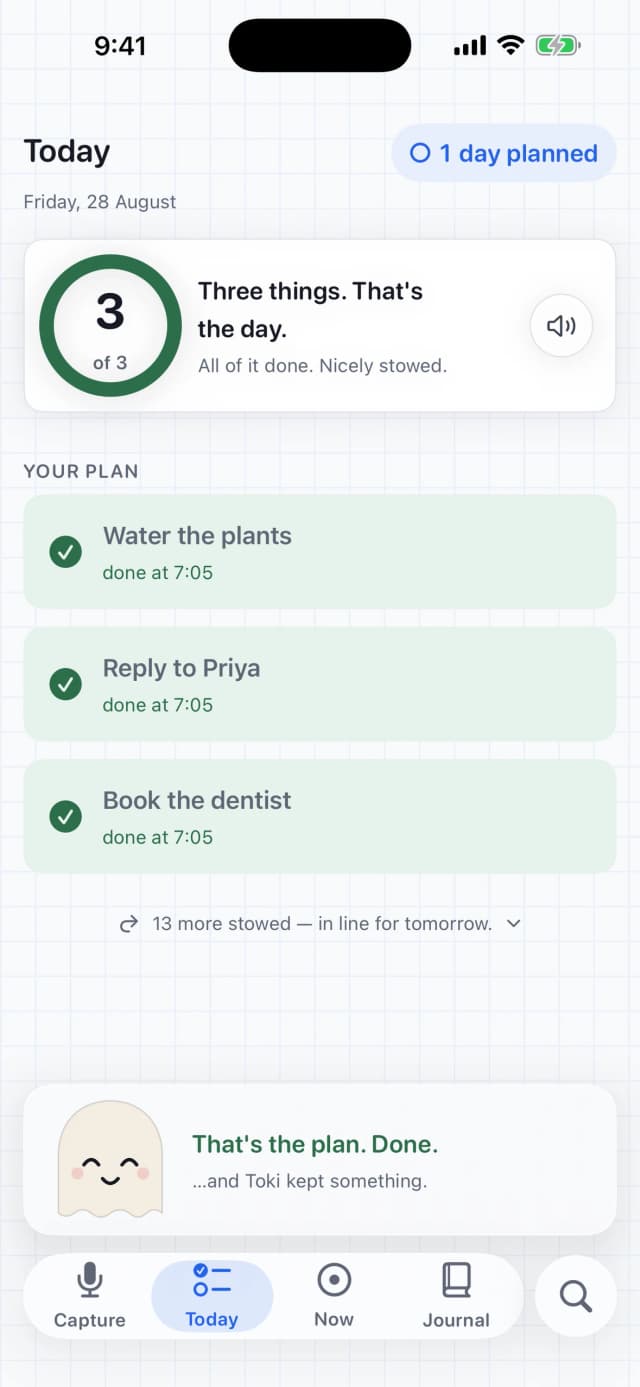
Stowe's Today screen with all three things done and Toki marking the day closed out.
Step four

Done.

Work down the list one item at a time, then close the day out. Tomorrow starts from what actually happened, not from a backlog.

Step five

The week tells itself back.

Closed days add up in the Journal — the week so far as one quiet mark, the run under it, Toki’s shelf beside it. A weekly reflection reads the week back in your own words, and at the end of the month a short paged review tells you which week carried it and what defined it. Your first month is free in full; every month after is Pro.

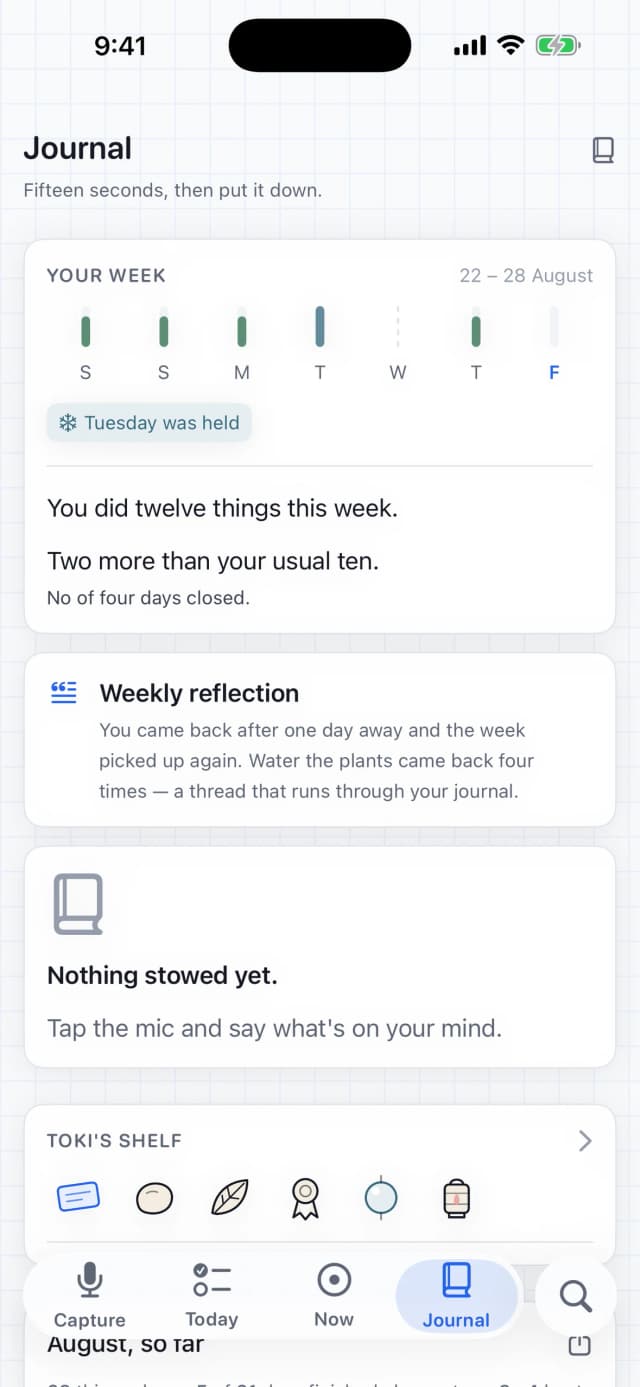
Stowe's Journal week view: Toki quiet in the header, the week so far as one mark, and the weekly reflection card that Pro fills in.
New in 2.0

Ask your planner anything.

Everything you ever said to Stowe is now answerable — a search tab that works like a question to a person, entirely on your device. Asking your list is free; asking your whole finished story is part of Stowe Pro.

No word overlaps. It still answers — meaning, matched on the phone itself.

Ask the way you talk

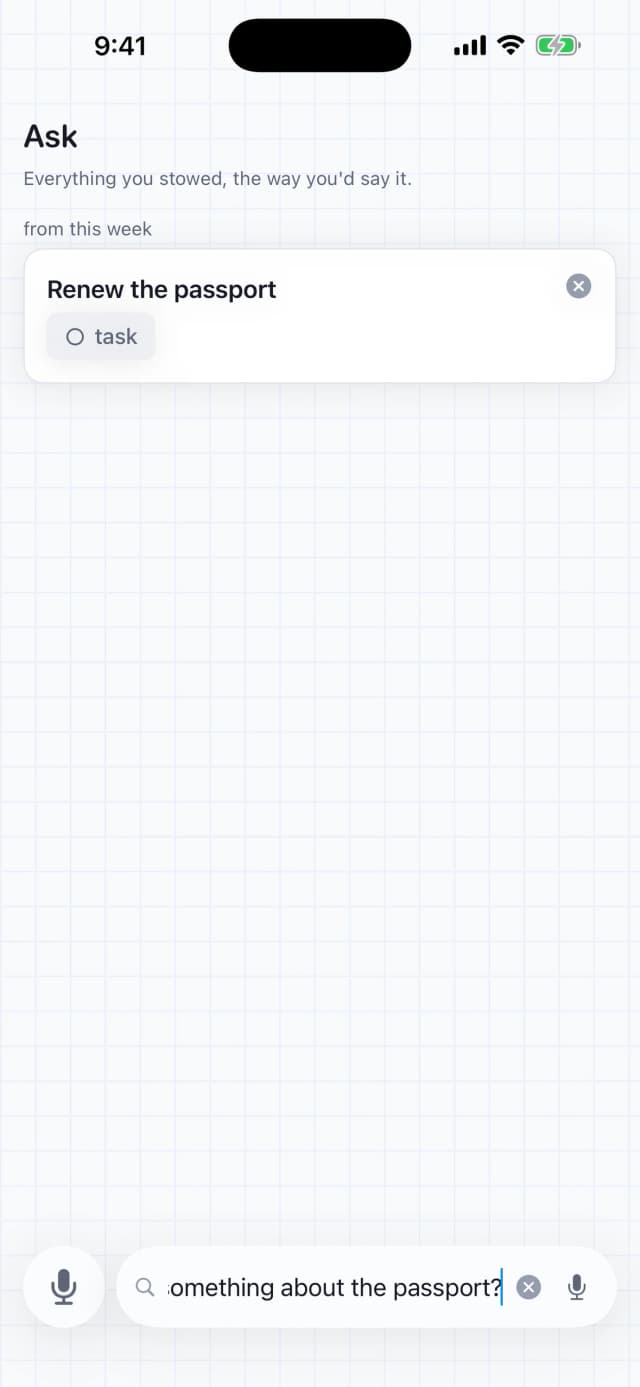
Type it or speak it — "did I say something about the dentist?" finds "Book a checkup for my teeth". English and Hinglish alike, understood on your phone, never on a server. Works in airplane mode.

Name a list, get the list

"What did we plan for the Goa trip?" answers with the whole trip — the list’s door and everything on it, not three fished-out guesses.

Once a week, something comes back

Toki carries back the oldest thing still with you and offers three honest moves: do it today, rest it a while, or let it go. Asking finds it again — letting go is never losing.

Company, not noise

Toki keeps you company. That’s the whole job.

It listens while you talk, sits quietly while you work, and marks the moment your day is done.

While you talk.

Attentive during capture. Never in the way.

While you work.

Quiet in Now and Journal. It’s not the point.

When the day’s done.

A small shimmy, then it settles.

What it does

Small app, few opinions, held firmly.

Stowe does the handful of things a daily planner should do, and does them without asking for your attention in return.

Voice capture that keeps up

Tap the mic and talk the way you actually talk — half sentences, tangents and all. Speech is transcribed on your phone. Typing works just as well.

An honest plan, not a wish list

On-device AI reads the dump and picks 3–5 things you can finish today. Everything else waits its turn — and the day comes with at most three gentle check-ins, nothing that shouts.

Say it, tag it, find it

Five tags to start — work, home, errands, people, health — plus any word of your own, one per item. Every tag wears a colour derived from the word itself, the same on every device. Tags are free, forever.

Ask your whole story

A search tab that answers questions the way you’d ask them — "did I say something about the dentist?" — spoken or typed, matched by meaning on your phone. Your list answers free; your finished story answers with Stowe Pro.

Widgets that keep the day close

Seven of them: today’s ring and plan, the run with Toki keeping watch, the next thing (your focus box, live), a list of your choice, and one old thing resurfaced daily. Designed for every iOS 26 look, tinted glass included.

The big thing, split into small ones

Ask Stowe to break a task into small steps — written on your device, never sent anywhere — or write your own. The first step is usually the whole battle. Part of Stowe Pro.

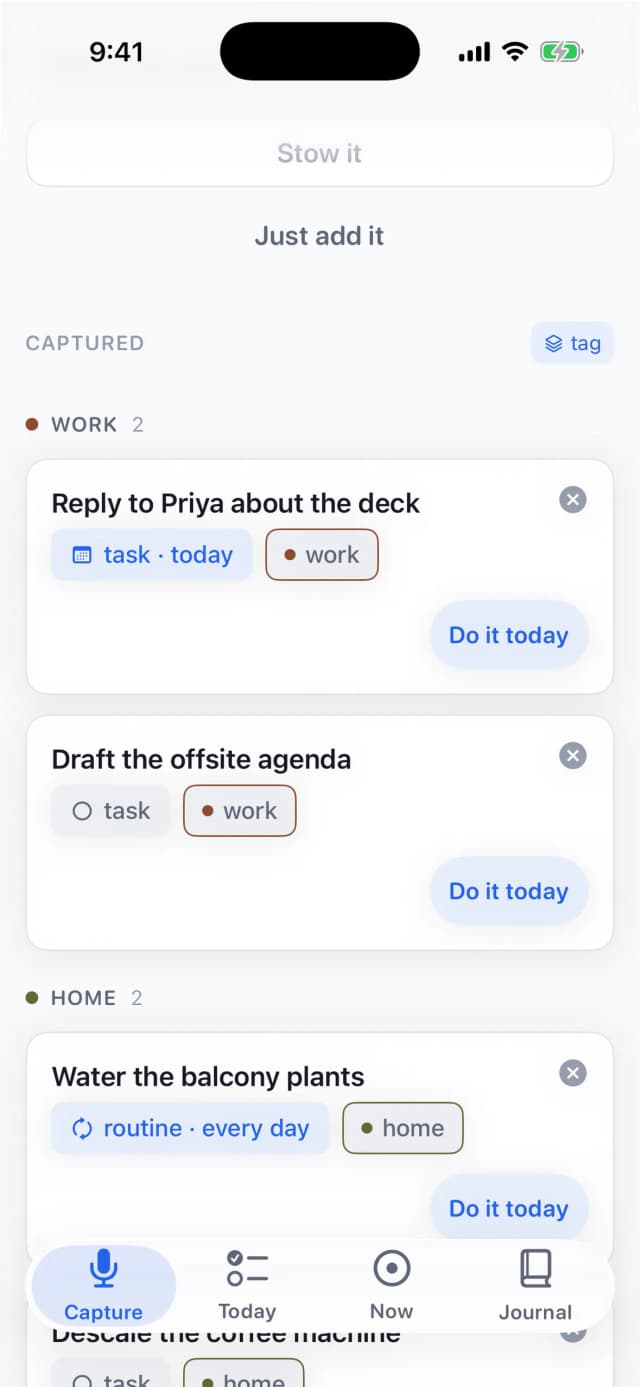
Captured, arranged how you think

Group the backlog by tag, by kind or by day, and sort inside each pile — newest, oldest, soonest or A–Z. Nothing is ever hidden, only arranged. Part of Stowe Pro.

On your wrist and your Mac

A thought on the walk home goes in from Apple Watch, sorted by the time you open your phone. On the Mac, ⌥Space opens a mic from the menu bar — talk, and get back to what you were doing.

A run that counts what happened

Days planned, best, held — never days missed. A bad Tuesday bends the run instead of breaking it, days off do not touch it, and nothing on the card can turn red.

Toki keeps things

Finish a day, plan a week, come back after a gap, and Toki keeps a small drawn object for it on a shelf in the Journal. Twelve to find. None for opening the app. None ever lost.

Private by design

Works in airplane mode. Your voice, tasks and plans stay on your devices and in your private iCloud — no accounts, no server of ours to leak.

New in 1.9

A list for every purpose.

A tag labels a thing. Arranging orders the room. A list is a separate room — a project, a trip, the groceries — one tap apart on a rail, never buried in a drawer.

GOA TRIP

The rail lives right above the backlog, on your iPhone and in the Mac's sidebar (⌥⌘↑ and ⌥⌘↓ step between lists at the desk). Six lists at most, on purpose — the sets that survive are small.

Capture lands where you stand

Switch to the trip list and everything you say lands in it — the one filing decision Stowe never guesses. Your wrist and widgets keep landing in Main.

Your tags work in every list

One tag catalogue across all of them, so "work" means the same thing everywhere — and each list remembers its own arrangement, grouped and sorted its own way.

The day stays one day

Lists split the backlog, never the plan. Today still holds 3–5 things from across your whole life, so no list becomes the place things go to die.

Making more lists is part of Stowe Pro. Your first list — and everything on it — stays free.

Toki keeps things

Nothing to lose. A few things to keep.

Finish a day, plan a week end to end, come back after a gap — and Toki keeps a small drawn object for it, on a shelf in the Journal. Twelve to find. None for opening the app. None ever taken away.

  • A slipYour first plan.
  • A stoneA whole day, finished.
  • A ribbonA week, planned end to end.
  • A leafFive days finished.
  • A featherTwenty days finished.
  • A shellFifty days finished.
  • A beadA day held while you were away.
  • A keyCame back after days away, then a plan.
  • A spoolTwenty-five things rolled, not dropped.
  • A bellFifty things said out loud.
  • A lanternA month, stowed.
  • A knotYour best run yet.

The shelf shows what is there and nothing else: no greyed-out silhouettes, no “3 more to find”, no score. Alongside it, the run card counts days planned, your best and days held — never days missed — and days off do not touch it. Toki wears the props that arrive with a few of these (a slip, a leaf in the hem, a scarf); all of it is free.

The whole app

Five screens. That’s the whole app.

Capture two ways — the mic, then the backlog it fills, tagged and arranged — Today, Now, and the journal twice over: the week, then every day so far. Nothing else to learn.
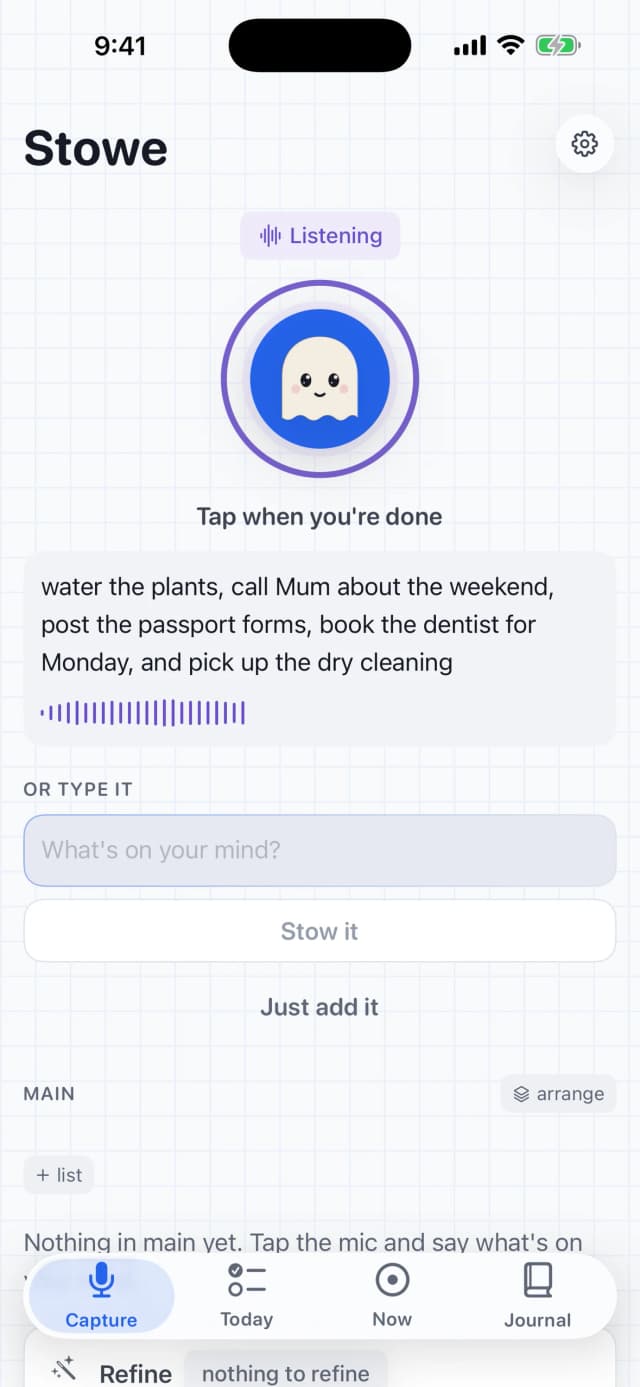
Stowe's capture screen mid-recording: Toki attentive in the mic circle, a live transcript filling in as you talk, latched so you can keep going hands-free.
Tap to talk. Toki listens.
Stowe's Ask tab answering the typed question 'did I say something about the passport?' with the card 'Renew the passport', found from last week.
Ask, the way you’d ask a person.
Stowe's Captured backlog grouped by colour-coded tags: a WORK group with two cards wearing clay 'work' chips, a HOME group in olive below, and the arrange control on the heading reading 'tag'.
Say it, tag it, find it.
Stowe's Today screen with all three things done: a green ring, checkmarks down the plan, and Toki saying 'That’s the plan. Done.'
Three things. All done.
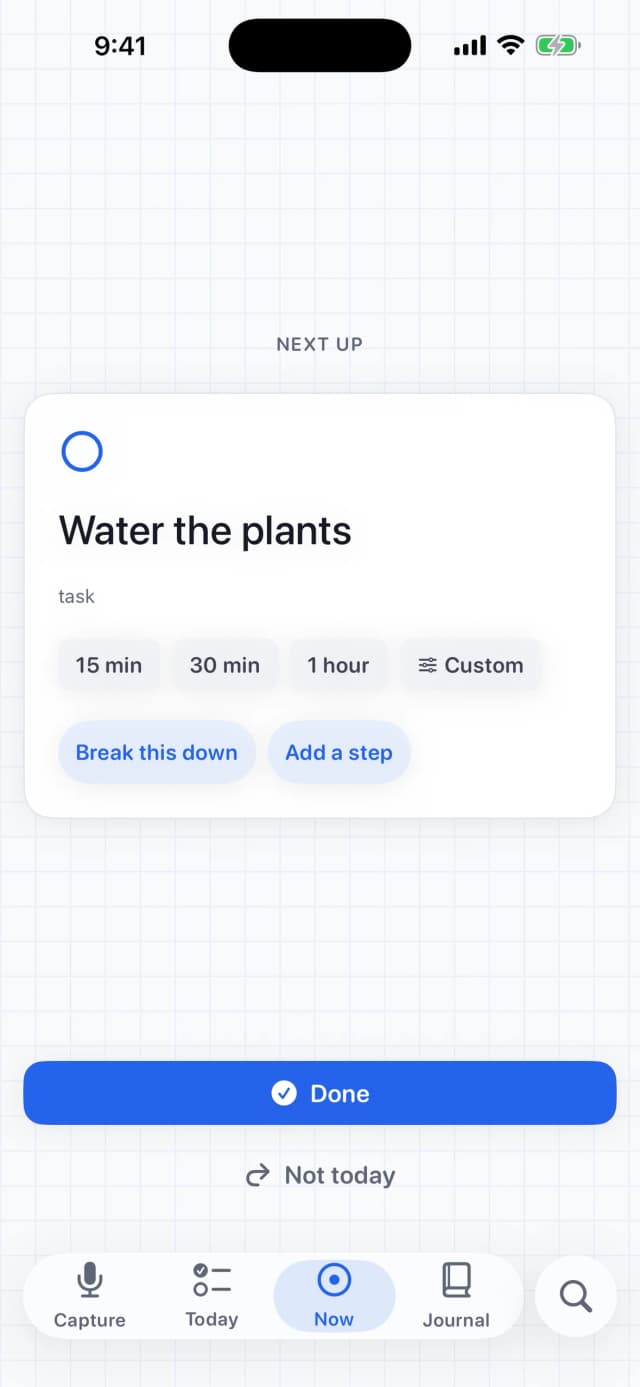
Stowe's Now screen holding one thing — 'Water the plants' — with time-box choices of 15 minutes, 30 minutes and an hour, and nothing else on screen.
One thing at a time.
Stowe's Journal: the week as seven marks with a held Tuesday, 'You did twelve things this week', a weekly reflection card, and Toki's shelf of keepsakes.
Your week, with company.
Now on the Mac

The menu bar learned to listen.

Same app, same one-tap capture — from the Mac menu bar. Tap the mic or press ⌥Space, talk, and get back to what you were doing. The same Today and Journal sit in a window when you want them.
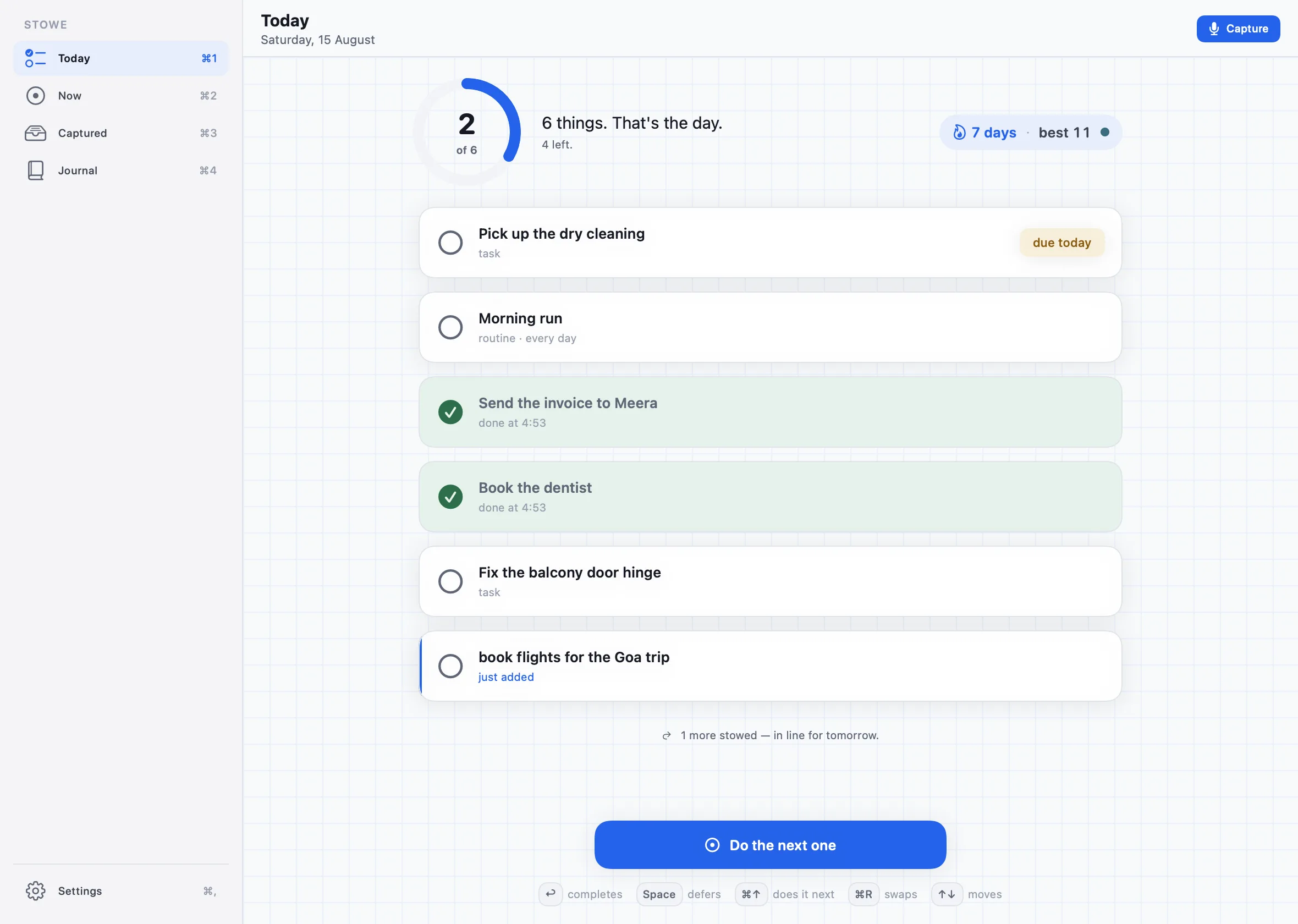
Stowe's Mac app: the Today room in a sidebar window — a progress ring at 2 of 6, the day's plan as cards, and a seven-day planning streak.
Download on theApp Store

One purchase covers iPhone, Mac and Watch.
Stowe Pro works across all three.

Stowe Pro

Free where it counts. Pro when it helps.

Speaking, planning and finishing your day are free. Pro unlocks everything else and keeps a one-person app funded — no ads, no data sold, ever.

Free, forever

The whole retention loop. None of this is for sale.

  • Voice and typed capture, on-device
  • The daily plan — 3–5 things
  • Tags — five to start, your own words, in colour
  • Three calm nudges + reminders you set
  • Widgets and the Lock Screen ring
  • The run card, with comeback grace and days off
  • Toki’s shelf and props — every keepsake, free
  • Seven days of journal history
  • Your first Month in Review, in full
What Pro is

Seven things, all shipped — the same seven rows the app shows before you pay.

  • The Watch app. Today's plan on your wrist. Hold to talk, it sorts on your phone.
  • Your whole story. Every day back to the first one, every month reviewed, your week connected by an on-device reflection — searchable, and yours to export and bring back.
  • Morning read-aloud. Stowe reads today's plan out loud.
  • Refine with AI. A second pass over a rambling draft.
  • Steps, notes and photos. Any task split into small steps on your device — or written yourself — and a note or a photo on anything: the counter number, the shelf label, the thing a sentence is bad at holding.
  • Your lists, arranged. More lists — a project, a trip, the groceries — each grouped by tag, kind or day and sorted its own way. Your first list, and tagging itself, stay free.
  • The icon pack. Five home-screen faces, one palette.
Monthly

Month to month. Keep it while it earns its place, stop when it doesn’t.

  • 7-day free trial, then billed monthly by Apple
  • Cancel any time in Settings → Subscriptions
Annual

The same Stowe Pro, paid once a year — for when the habit has stuck.

  • 7-day free trial, then billed yearly by Apple
  • Cancel any time in Settings → Subscriptions

Prices are set per territory, so the App Store shows yours — with the trial and the renewal date — before you agree to anything. Subscriptions are handled by Apple; restore a purchase from Stowe’s Settings.

Download on theApp Store
Questions

Things people ask before they try it.

Straight answers, since a planner asking for trust should earn it.

Do tags cost anything?
No. Tags are free, forever — five to start (work, home, errands, people, health) plus any word of your own, one per item, each wearing a colour derived from the word itself. What Pro sells is arranging: grouping the backlog by tag, kind or day, and sorting inside each pile.
Can I organise the backlog?
Yes, two ways. Group any list by tag, by kind or by day, and sort inside each pile — newest, oldest, soonest first, or A to Z; each list remembers its own arrangement. And since 1.9 you can keep separate lists — a project, a trip, the groceries — switched on a rail above the backlog. Nothing is ever hidden, only arranged. Arranging and extra lists are part of Stowe Pro; tagging, and your first list, stay free.
Is Stowe private? Does my data go to a server?
No. Stowe transcribes and understands everything on your iPhone with on-device AI. Your voice, tasks and plans stay on your devices and in your private iCloud — no account, and no server of ours to leak. Stowe even works in airplane mode.
How is Stowe different from other AI daily planner apps?
Most AI planners auto-schedule your whole calendar or send your data to the cloud. Stowe does one thing well: turn a spoken brain dump into 3–5 doable things for today, entirely on-device, with no account required.
Do I have to type, or can I just talk?
Talk. Tap the mic and say whatever is in your head — half sentences and tangents included. Typing works just as well if you would rather.
Does Stowe work on Apple Watch?
Yes. Capture a thought from your wrist with Apple Watch, and it's waiting, sorted, next time you open your phone.
What happens if I miss a day?
The run bends before it breaks. Miss a day and a freeze holds it; days you set as days off are neither planned nor missed. The run card counts days planned, your best and days held — it never counts days missed, and it never turns red.
Is Stowe free?
Yes. Capture, tags, the daily plan, nudges, widgets, streaks and the last 7 days of journal are free. Stowe Pro is an optional subscription that adds the Watch app, your whole story (every day back to the first, every month reviewed, export and backup), morning read-aloud, Refine with AI, steps on any task, notes and photos, your lists arranged — more lists for more purposes, each grouped and sorted its own way — and the icon pack.